 Download solution manual for Structural analysis by R.C. Hibbeler 7th edition.This book provides students with a clear and thorough presentation of the theory and application of structural analysis as it applies to trusses, beams, and frames. Emphases are placed on teaching readers to both model and analyze a structure. A hallmark of the book, Procedures for Analysis, has been retained in this edition to provide learners with a logical, orderly method to follow when applying theory. Chapter topics include types of structures and loads, analysis of statically determinate structures, analysis of statically determinate trusses, internal loadings developed in structural members, cables and arches, influence lines for statically determinate structures, approximate analysis of statically indeterminate structures, deflections, analysis of statically indeterminate structures by the force method, displacement method of analysis: slope-deflection equations, displacement method of analysis: moment distribution, analysis of beams and frames consisting of nonprismatic members, truss analysis using the stiffness method, beam analysis using the stiffness method, and plane frame analysis using the stiffness method. For individuals planning for a career as structural engineers. (reference: amazon)
Saturday, 31 December 2011
Solution manual for Structural analysis by R.C. Hibbeler
Download solution manual for Structural analysis by R.C. Hibbeler 7th edition.This book provides students with a clear and thorough presentation of the theory and application of structural analysis as it applies to trusses, beams, and frames. Emphases are placed on teaching readers to both model and analyze a structure. A hallmark of the book, Procedures for Analysis, has been retained in this edition to provide learners with a logical, orderly method to follow when applying theory. Chapter topics include types of structures and loads, analysis of statically determinate structures, analysis of statically determinate trusses, internal loadings developed in structural members, cables and arches, influence lines for statically determinate structures, approximate analysis of statically indeterminate structures, deflections, analysis of statically indeterminate structures by the force method, displacement method of analysis: slope-deflection equations, displacement method of analysis: moment distribution, analysis of beams and frames consisting of nonprismatic members, truss analysis using the stiffness method, beam analysis using the stiffness method, and plane frame analysis using the stiffness method. For individuals planning for a career as structural engineers. (reference: amazon)
Thursday, 29 December 2011
Find out amazing google searches: 'Do a barrel roll' or 'let it snow'
Google being one of the biggest search engine introduces a little fun while searching on the web. Let's start with the "tilt".
1. Type "tilt" or "askew" in the google search engine and see what happens, the screen lean to the right.
 2. Type "do a barrel roll" or "Z or R Twice", it will rotate the page to 360 degree.

1. Type "tilt" or "askew" in the google search engine and see what happens, the screen lean to the right.


Tuesday, 27 December 2011
Use your USB as a RAM
Make faster your pc by connecting your USB drive. Just follow these simple steps:
1. Connect your USB to your PC (it must be of 2Gb or more)
2. Now right click on "my computer" to open system properties dialog
3. Now go to advanced tab
4. Under performance section click "settings".
5. A performance properties open, now go to advanced tab.
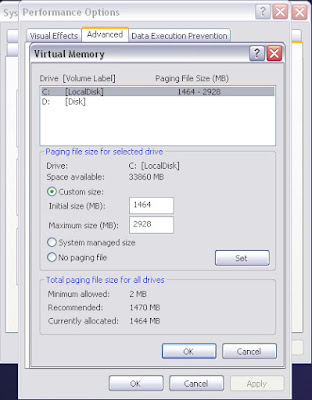
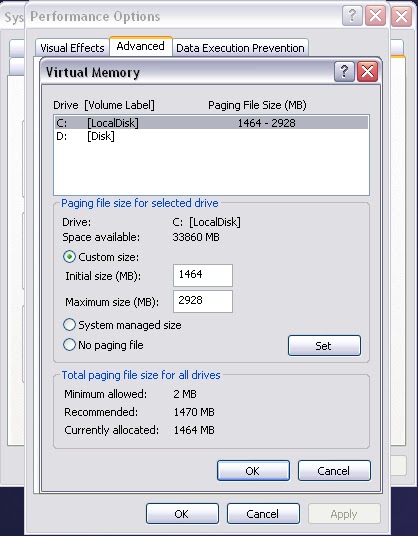
6. Under virtual memory section click on "change"
7. Now virtual memory will open select your USB drive then check custom size
8. Check the space available on your drive and enter the same in initial and maximum size.
9. Now click OK and restart your PC.
Important: Don't disconnect the USB, if you want to disconnect undo all the above steps
1. Connect your USB to your PC (it must be of 2Gb or more)
2. Now right click on "my computer" to open system properties dialog
3. Now go to advanced tab
4. Under performance section click "settings".
5. A performance properties open, now go to advanced tab.
6. Under virtual memory section click on "change"
7. Now virtual memory will open select your USB drive then check custom size
8. Check the space available on your drive and enter the same in initial and maximum size.
9. Now click OK and restart your PC.
Important: Don't disconnect the USB, if you want to disconnect undo all the above steps
Speed up your work with keyboard shortcuts
Easy way to speed up your work is to learn keyboard shortcuts. Following are some basic windows shortcut keys which help you to work efficiently.
KEYS
|
FUNCTION
|
| CTRL + C | copy |
| CTRL + X | cut |
| CTRL + f | find |
| CTRL + V | paste |
| WIN Key+D | Show the desktop |
| WIN Key | Display or hide the Start menu |
| WIN Key+BREAK | Display the System Properties dialog box |
| WIN Key+M | Minimize all windows. |
| WIN Key+Shift+M | Restores minimized windows. |
| WIN Key+E | Open My Computer |
| WIN Key+F | Search for a file or folder |
| CTRL+WIN Key+F | Search for computers |
| WIN Key+F1 | Display Windows Help |
| WIN Key+ L | Lock your computer if you are connected to a network domain, or switch users if you are not connected to a network domain |
| WIN Key+R | Open the Run dialog box |
| WIN Key+U | Open Utility Manager |
| ALT + Tab | Switch between windows |
| CTRL + Shift + Esc | Task Manager |
| CTRL+TAB | Move forward through tabs |
| CTRL+SHIFT+TAB | Move backward through tabs |
| TAB | Move forward through options |
| SHIFT+TAB | Move backward through options. |
| SHIFT five times | Switch StickyKeys on and off |
| SHIFT+DELETE | Delete selected item permanently without placing the item in the Recycle Bin |
| CTRL+RIGHT ARROW | Move the insertion point to the beginning of the next word. |
| CTRL+LEFT ARROW | Move the insertion point to the beginning of the previous word |
| CTRL+DOWN ARROW | Move the insertion point to the beginning of the next paragraph. |
| CTRL+UP ARROW | Move the insertion point to the beginning of the previous paragraph. |
| CTRL+SHIFT with any of the arrow keys | Highlight a block of text. |
| ALT+ESC | Cycle through items in the order they were opened. |
| ALT+TAB | Switch between open items |
| CTRL+A | Select all. |
| CTRL+ESC | Display the Start menu |
| ALT+SPACEBAR | Opens the shortcut menu for the active window |
| ALT+F4 | Close the active item, or quit the active program |
| ALT+ENTER | View properties for the selected item. |
Friday, 23 December 2011
Live cameras trick from google
Google allows to watch live security cameras with a simple trick just type in your search bar
inurl:view/index.shtml (it will show live traffic or airport cameras)
OR
liveapplet
Click on any result to view live camera
Enjoy!!!
Subscribe to:
Posts (Atom)